AI-FIRST LEGAL INTELLIGENCE

Legal intelligence,

built into the operation.

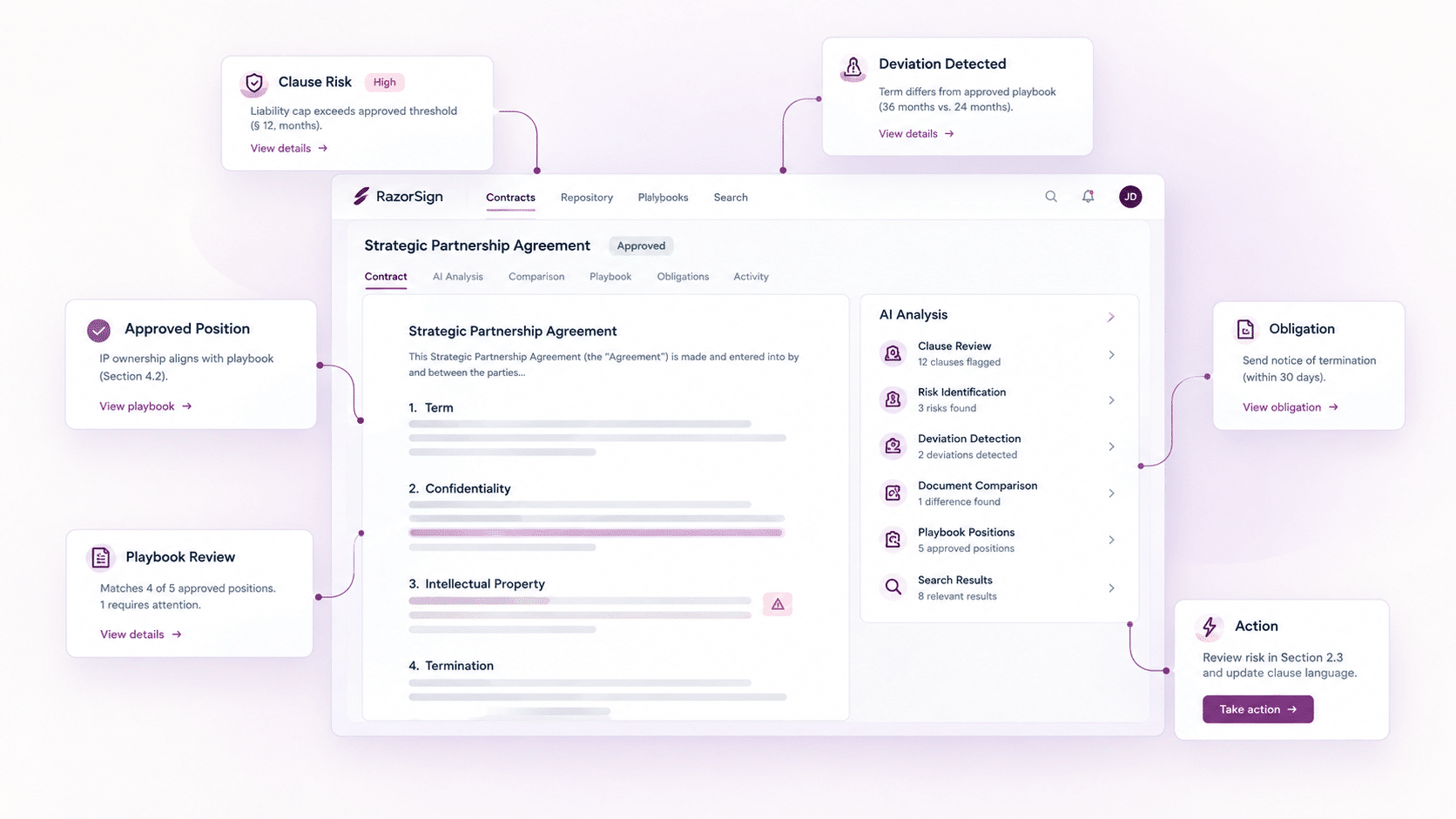
SensAI applies approved legal positions, reviews contract language, governs deviations, compares documents, searches authorised repositories and converts findings into action across RazorSign

BEYOND LEGAL AI ASSISTANCE

The answer is only useful if the work can use it.

Most legal AI produces an answer. SensAI works within the legal system that must use it. Review findings can become deviations. Deviations can enter approval. Contract terms can become obligations. Obligations can become owned tasks. The source, decision and action remain connected.

Review
Review

Apply standards, identify exceptions and assess risk.

Compare
Compare

Compare clauses, documents and versions.

Search
Search

Ask files, contracts and authorised repositories.

Draft
Draft

Generate, rewrite and refine legal language.

Act
Act

Create deviations, approvals, obligations and tasks.

SENSAI PLAYBOOK

Institutional legal judgement. Applied consistently.

SensAI Playbook turns approved clauses, starting positions, fallback language, negotiation guidance, risk parameters and non-acceptable terms into a controlled review framework.

From approved precedent to governed Playbook.

SensAI analyses a selected contract template and prepares an initial Playbook containing recommended positions, fallbacks and negotiation guidance. Legal reviews, adjusts and approves the framework before use.

DEVIATIONS AND AUTO REDLINING

Contract review,

governed at clause level.

SensAI identifies non-standard language and missing protection. RazorSign records the clause, deviation, risk, business impact, approved position, approver and status. Auto Redlining presents approved or fallback language for review. The exception remains visible from identification through resolution.

01

Identify

Clause, deviation and missing protection.

02

Assess

Risk, explanation and business impact.

03

Resolve

Preferred clause, starting position, fallback or rewritten alternative.

04

Approve

Rule-specific approver, comments, status and retained decision.

Reviewers can apply or edit suggested language, compare the revised draft and re-run Playbook Review after the contract changes. Current Auto Redlining is primarily suited to early review and Playbook enforcement. 

SENSAI WORKSPACE

One workspace for legal analysis.

Upload documents. Ask questions. Compare versions. Run predefined actions. Use voice. Select supported models. Generate charts. Export results. Copy formatted output into Microsoft Word.

SensAI-WorkSpace-One-workspace-for-legal-analysis

Uploaded File Q&A

Ask questions across one or more uploaded documents.

Open-record Q&A

Work with the contract or legal record already in view.

AI Tiles

Run configured actions for Summary, Key Clauses, Risks, Obligations, Insights, Rewrite and more.

Voice Chat

Ask questions by voice where enabled.

Resizable Workspace

Resize, maximise or minimise SensAI during longer work.

Formatted Copy

Copy AI output into Microsoft Word with formatting.

Interactive Charts

Turn available contract data into visual analysis.

Export

Download contract data and AI-generated results.

AI Prompt Master

Configure prompt-led actions and reusable AI tasks.

Deep Search

Natural-language search across authorised legal data.

Ask portfolio-level questions across contracts and legal documents. SensAI returns context-aware answers with supporting references, without requiring the exact filename, folder or keyword.

Example questions

Which contracts expire this quarter?

Show contracts with unlimited liability.

Find payment terms above 90 days.

Which vendors have non-standard renewal terms?

Which obligations are due next month?

Natural Language

Ask the business question directly.

Context

SensAI interprets the question against available information.

References

Trace the answer to supporting material.

Scope

Search authorised contracts and documents.

DOCUMENT COMPARISON

Material change, clearly presented.

Compare the current contract with previous versions, approved templates, third-party documents or multiple uploaded files. Review additions, deletions and changed language in a structured comparison.

AI Clause Review
Current vs Previous

Review changed language across contract versions.

Compare
Current vs Uploaded

Compare an open contract with third-party paper or an approved template.

Documents
Multiple Documents

Ask questions and examine differences across several uploaded files.

DRAFTING

Controlled legal drafting and refinement.

Generate clauses and contract content. Rephrase existing language. Refine tone, format and length. Compare alternative responses from supported models where configured.

Generate

Create contract or clause content

Rephrase

Rewrite existing language for clarity or a different expression.

Refine

Improve wording and present alternatives.

Control

Use available tone, format and length controls.

Executive dashboards bring workload, progress, cost and risk exposure into one management view.

EXTRACTION AND ACTION

Legal information, made operational.

Extract metadata, clauses, dates, terms and obligations. Structure contract records, support migration and convert relevant commitments into tasks with owners and due dates.

Extract

Metadata, clauses, dates, terms and obligations.

Structure

Repository records, migration data and legal information.

Act

Obligations, owners, tasks and due dates inside RazorSign.

MULTI-MODEL AI

Model choice without workflow fragmentation.

Use supported models including OpenAI, Anthropic Claude, Google Gemini and Qwen or other approved options, depending on configuration. SensAI maintains the legal workflow while the selected model performs the task.

Choice

Select supported models where enabled.

Administration

Manage configuration-dependent model selection and AI settings.

Continuity

Use SensAI across the application during the session.

MCP AND CONNECTED AI

Permission-controlled access to authorised legal data.

Compatible AI assistants can access authorised repository information through configured MCP connections. Access remains subject to permissions, security controls, repository scope and implementation design. Historical access is limited to information available in the authorised repository.

SENSAI ACROSS RAZORSIGN

Legal intelligence should remain with legal work.

Contract Lifecycle Management

Playbook Review, deviations, Auto Redlining, Contract Chat, Deep Search, comparison, extraction and drafting.

Matter Management

Document summaries, Ask Your Files, search, interactive chronology and available case insights.

Compliance Management

Search, extraction and legal-document assistance within authorised compliance work.

Razor365

Selected SensAI and MCP capabilities according to package and configuration.

HUMAN CONTROL

AI-supported. Professionally governed.

SensAI supports analysis, drafting and action. Authorised professionals retain review, judgement and approval. AI-generated outputs may contain inaccuracies or omissions and should be validated before use in legal, business or compliance decisions.

Permissions

SensAI processes information available to the authorised user.

Review

Legal professionals review findings, recommendations and generated language.

Accountability

Approvals and operating decisions remain with the organisation.

FAQs

What is SensAI?

SensAI is RazorSign’s legal AI layer for review, Playbooks, redlining, comparison, search, extraction, rewriting, charts, exports and workflow action.

SensAI includes conversational interaction and also supports Playbook Review, Auto Redlining, document comparison, Deep Search, extraction, charts, exports and RazorSign workflows.

Yes. Current material names OpenAI, Anthropic Claude, Google Gemini and Qwen or other supported options. Availability and data handling depend on configuration.

Deep Search works across authorised contracts and legal documents, subject to permissions, indexing and configuration.

SensAI can analyse a selected standard template and prepare an initial Playbook. Legal reviews and approves the positions and guidance before use.

SensAI can compare the current contract with previous versions or uploaded documents and present changes in a structured comparison.

SensAI can extract obligations from contracts and create actionable tasks within RazorSign workflows.

No. Authorised professionals retain judgement, review and approval.

Scroll to Top

Act

Multi-document Q&A

Ask questions across one or more uploaded files.

Act

AI Tiles

Contract Summary, Key Clauses, Risks, Obligations, Insights, Rewrite and other configured actions.

Act

Voice Interaction

Ask questions by voice where enabled.

Act

Multi-model Support

Use supported AI models according to the selected configuration.

Act

Formatted Output

Copy AI results into Microsoft Word in a usable format.

Act

Charts and Export

Use available analysis, visualisation and export options.

Act

MCP Access

Allow compatible AI assistants to access authorised contract-repository data according to configuration and security controls.

Act

Confidential Information Redaction

Redact confidential information for relevant review and sharing workflows.

Act

Rephrase and Rewrite

Generate clearer or alternative language, including starting-position rewrite support.

Act

Obligation Extraction

Identify obligations and convert relevant commitments into actionable tasks.

Act

Metadata Extraction

Extract contract information to support repository structure and migration.