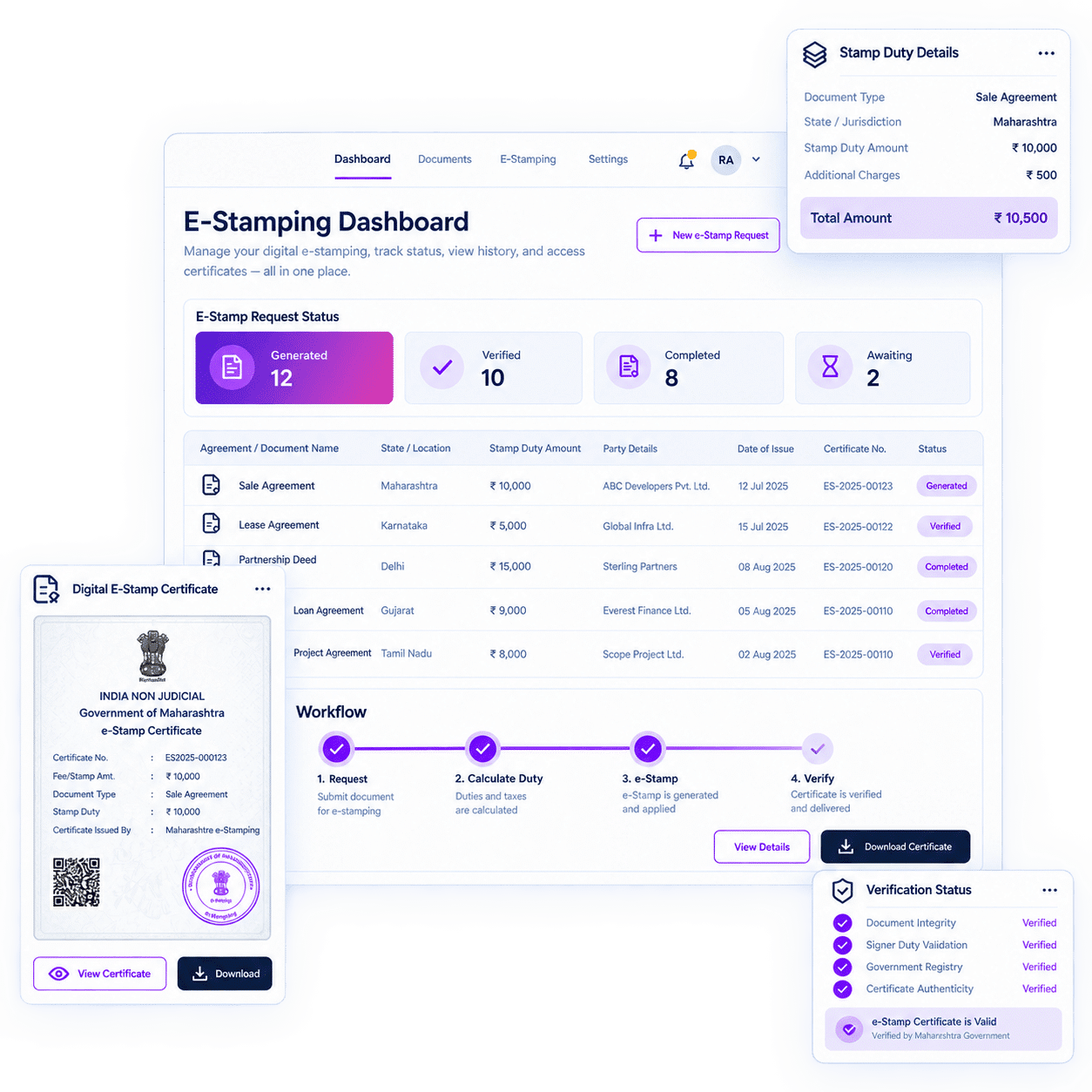
CONTRACT EXECUTION

Signing is one event.

Execution is the complete record.

RazorSign connects electronic signatures, e-Stamping, signatories, workflows, status and audit records with the document and contract process.

Playbook
Prepare
Auto redlining
Route
eStamp Physical
Stamp
Esign-Stamp
Sign
Case Records
Record
Budget Tracking
Track

Complete Electronic Execution

Electronic signatures, stamping, signer controls, workflow, evidence and contract continuity. The execution process stays connected from preparation through the final record.

EXECUTION OPERATING MODEL

A signature ends the chase. Execution needs more.

RazorSign keeps preparation, stamping, signing, status, evidence and the final document in one execution flow. Stamping and signing remain separate legal and operational processes, even when managed through the same platform.

Invoice Operation

Prepare

Prepare the document and required transaction information.

Stamp

Initiate the applicable stamp-duty fulfilment mode.

Route

Apply the supported signing workflow and authority.

Sign

Complete the supported electronic signature process.

Record

Retain status, audit information and the executed document.

ELECTRONIC SIGNATURES

The document is ready. The signers should be too.

Prepare, route and execute supported electronic signature workflows. Maintain self-party and counterparty details, signing authority, multi-party signing, status, notifications, audit trail and history with the document. 

Workflows
Workflow

Pre-defined signing workflow and signing authority.

Esign-Stamp
Signatories

Self-party, counterparty and multi-party signing details.

Documents
Status

Signing status and notifications

Case Records
Record

Audit trail, history and document download after completion.

SIGNER VERIFICATION AND EVIDENCE

Identity and transaction evidence,

retained with the signing event.

Current product records include multi-factor-authentication-enabled signatures and signatory geolocation, image, IP and device tagging. The live webpage also lists UIN-based signatures, geo-tagging and photo verification.

01

Authentication

Multi-factor-authentication-enabled signatures.

02

Location

Signatory geolocation or geo-tagging.

03

Image

Signer image or photo verification.

04

Technical Evidence

IP and device tagging with available audit history.

Different execution needs. One signing infrastructure.

The current webpage lists UIN-based signatures, bulk signing, clickwrap agreements, DSCII and DSCIII. Availability should remain aligned with the selected package, workflow and jurisdiction.

DSC and UIN
UIN-based

Signature linked to a Unique Identification Number.

Bulk Signing
Bulk Signing

Sign multiple documents through the supported bulk-sign facility.

Clickwrap
Clickwrap

Capture acceptance through a click-based agreement workflow.

DSCII and DSCIII
DSCII and DSCIII

Use supported Digital Signature Certificate standards.

Execution should remain where the document already lives.

Product records reference Word-based eSignature activity, the Razor eSign app for Microsoft Teams and third-party eSignature integration. Availability is product and integration dependent.

Microsoft word
Microsoft Word

Visibility from intake and allocation through review.

Microsoft Teams
Microsoft Teams

Razor eSign app for Microsoft Teams.

Integration
Third-party Integration

Listed third-party eSignature integration.

Repository
Contract Record

Execution information retained with the document or contract.

Stamp duty varies by jurisdiction. The workflow should account for it.

RazorSign enables enterprises to initiate and manage stamp-duty fulfilment as part of the document and contract workflow. The applicable mode depends on the relevant State or Union Territory, transaction, authorised infrastructure and operational availability.

Digital
Digital

The request is initiated through RazorSign and the e-Stamp certificate is generated electronically through integrated authorised infrastructure.

Esign-Stamp
eStamp-Physical

The request is initiated digitally, while issuance, procurement or collection requires an authorised physical process.

Traditional Physical
Traditional-Physical

Physical non-judicial stamp paper may be procured through an authorised channel where integrated e-Stamp fulfilment is unavailable.

State-specific Physical

Supported State mechanisms may include eGRAS, NGDRS 2.0 or eSBTR.

Digital where the authorised infrastructure permits it.

For supported digital transactions, RazorSign initiates the request and the e-Stamp certificate is generated electronically through integrated authorised e-Stamping infrastructure. Physical procurement or collection is ordinarily not required. 

One request path. Different authorised fulfilment mechanisms.

Where certificate issuance, procurement or collection requires a physical process, RazorSign coordinates fulfilment through the applicable authorised channel where supported. Scanned copies may support digital continuation of the transaction while the physical certificate is collected and couriered. Traditional physical stamp paper may be used where integrated e-Stamp fulfilment is unavailable.

TURNAROUND AND DELIVERY

Indicative timelines, stated with the dependencies intact.

Timelines commence after receipt of complete and accurate information, required approvals and documentation, and sufficient prepaid balance. They are estimates, not guaranteed service levels, and may vary because of State or Union Territory holidays, authorised-system availability, banking, collection-centre availability, denomination or stock availability, regulation and logistics.

Digital e-Stamp

Typically instant; up to 2 business hours.

eStamp-Physical

Typically 1 business day for scanned copy.

State-specific physical

Typically 1 business day for scanned copy.

Traditional physical stamping

Typically 5-10 business days, subject to availability.

Courier / physical delivery

Processed every 15 days, with an additional 2-5 business days depending on destination and serviceability.

COVERAGE

Coverage is jurisdiction-specific and operationally current, not permanent.

The attached proposal contains State and Union Territory coverage by fulfilment mode, including digital, eStamp-Physical, traditional physical and State-specific mechanisms. Coverage, mode, minimum quantities and availability may change with local rules, authorised infrastructure, regulatory changes and serviceability. The published page should therefore use an approved, maintainable coverage matrix rather than a permanent marketing claim.

AI Clause Review
Current serviceable State/UT and mode.

Validate against the current operating matrix before publication.

Compare
“Yet to launch” or future phase.

Do not present as currently available.

Documents
Minimum quantity condition.

Display wherever applicable.

Documents
Not available.

State clearly in the maintained coverage matrix.

STAMP-DUTY RESPONSIBILITY

RazorSign facilitates stamping. The customer determines the duty.

The client remains responsible for verifying the State or Union Territory, stamp article or document type, consideration value, duty amount, party details and fulfilment mode before submission. RazorSign and PracticeLeague act as technology and fulfilment facilitators and do not independently issue government e-Stamp certificates or provide legal or tax advice.

TRANSACTION CONTROL

A stamping request is an approved transaction, not an editable draft.

Initiating an e-Stamping transaction confirms that the client has reviewed and approved the transaction particulars, applicable jurisdiction, stamp article, duty amount and fulfilment mode. Once a stamp or e-Stamp is issued or procured, cancellation, correction and refund are governed by the relevant State or Union Territory and authorised authority.

Before submission

Verify transaction information, duty, parties, mode and sufficient prepaid balance.

After issuance

Cancellation, correction or refund follows the applicable authority’s rules.

Failed or pending

Reconciliation and any credit or refund depend on status confirmation and settlement by the relevant authority or channel.

EXECUTION SEPARATION

Stamped is not signed. Signed is not necessarily stamped.

Stamping and electronic signing are separate processes. Successful stamping does not by itself execute the underlying document. RazorSign connects the processes operationally while preserving the distinction.

SECURITY AND AUDIT

The signing record should explain what happened.

The live webpage describes public-key encryption, enhanced signer identification and audit trails. Product records also include signing status, notifications, history and signatory tagging. Detailed security and legal-validity claims should remain aligned with approved security and legal documentation.

Resources

A True CLM Solution for

FAQs

Does RazorSign support both electronic signatures and e-Stamping?

Yes. RazorSign connects supported electronic signature and e-Stamping workflows with document and contract execution. 

No. Fulfilment may be digital, eStamp-Physical, traditional physical or State-specific physical, depending on the relevant jurisdiction and supported infrastructure.

No. Stamping and signing are separate processes.

No. RazorSign and PracticeLeague act as technology and fulfilment facilitators.

Current sources list UIN-based signatures, bulk signing, clickwrap, DSCII, DSCIII, multi-party signing and supported electronic signature workflows.

Current product records include geolocation, image, IP and device tagging, together with signing status, notifications, audit trail and history.

No. The attached proposal states indicative timelines and identifies jurisdictional, system, banking, stock, regulatory and logistics dependencies.

The client remains responsible for determining the correct stamp article and duty under applicable law.

Scroll to Top

Act

Multi-document Q&A

Ask questions across one or more uploaded files.

Act

AI Tiles

Contract Summary, Key Clauses, Risks, Obligations, Insights, Rewrite and other configured actions.

Act

Voice Interaction

Ask questions by voice where enabled.

Act

Multi-model Support

Use supported AI models according to the selected configuration.

Act

Formatted Output

Copy AI results into Microsoft Word in a usable format.

Act

Charts and Export

Use available analysis, visualisation and export options.

Act

MCP Access

Allow compatible AI assistants to access authorised contract-repository data according to configuration and security controls.

Act

Confidential Information Redaction

Redact confidential information for relevant review and sharing workflows.

Act

Rephrase and Rewrite

Generate clearer or alternative language, including starting-position rewrite support.

Act

Obligation Extraction

Identify obligations and convert relevant commitments into actionable tasks.

Act

Metadata Extraction

Extract contract information to support repository structure and migration.