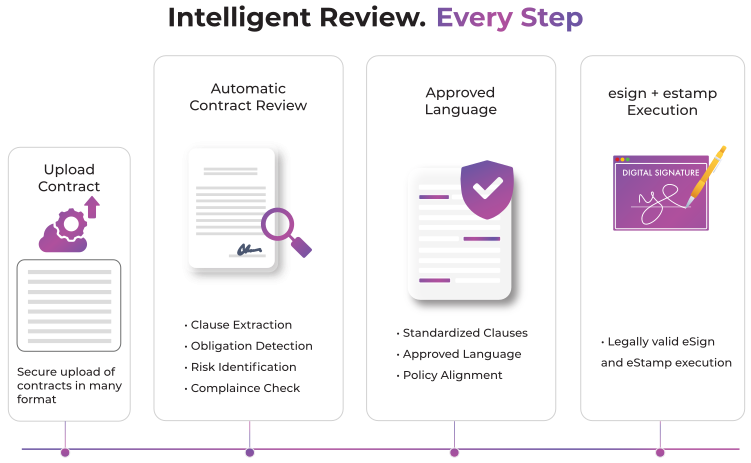
The CLM that reads the contract

AI Contract Lifecycle Management

The CLM that reads the contract.

And runs the lifecycle.

SensAI reviews clauses against your standards. Playbook-driven decisions, auto redlining, and Deep Search turn contracts into governed, actionable intelligence.

Playbook
Playbook
Auto redlining
Auto Redlining
Deep Search
Deep Search
Esign-Stamp
eSign + eStamp

SensAI Playbook

Your best lawyer cannot review every contract.

Your Playbook can.

SensAI Playbook turns legal policy into a live review system. Every clause is tested against approved positions, fallback ranges, non-negotiables and escalation rules.

Turn precedent into policy. Automatically.

Use your contract history to create consistent, organization-wide standards – powered by AI.

Deviation Management

Track changes show wording.

Deviations show exposure.

Payment terms, liability, indemnity, insurance, data protection and IP ownership are not formatting changes. RazorSign gives material deviations their own governed workspace, with clause context, risk, impact, approver, decision and status.

01

Detect

Automatic creation after Playbook Review; non-standard and missing clauses.

02

Resolve

Approved clause, starting position, fallback language or rewritten alternative.

03

Approve

Rule-specific approver, comments and status.

04

Retain

Decision history with the contract record.

Auto Redlining

The approved response, ready in the draft.

SensAI identifies deviations, suggests approved language, and enables teams to review, compare, and re-run the Playbook-keeping every contract change governed and controlled.

SENSAI IN CLM

SensAI is not the chat window.

It is the work inside CLM.

Draft, review, compare, search and act without leaving the contract lifecycle.

Draft

Draft

Generate, rewrite and refine contract language.

Review

Review

Apply Playbooks, assess risk and surface approved positions.

Compare

Compare

Compare versions, templates and uploaded documents.

Search

Search

Ask the open contract, uploaded files or the authorised contract estate.

Act

Act

Create deviations, route approvals, extract obligations and create tasks.

SENSAI IN CLM

One contract. One question.

No manual reading marathon.

Draft, review, compare, search and act without leaving the contract lifecycle.

Open contract

Summaries, clauses, risks, obligations, dates, insights and other questions.

Uploaded documents

Upload one or more files and ask questions across them in natural language.

Ready-made actions

Use configured AI Tiles instead of rebuilding routine prompts.

Deep Search

Your contract repository should answer back.

Deep Search works across authorised contracts and legal documents, returning context-aware answers with supporting references.

Questions buyers can ask

Which supplier agreements contain unlimited liability?
Which contracts renew next quarter?
Which agreements are missing the required data-protection clause?
Which obligations are due next month?
Which contracts deviate from the approved position?

DOCUMENT AND VERSION COMPARISON

Turn version history into decision history.

Review additions, deletions and changed language against the current contract. Compare third-party paper, an apporved template, a previous version or several uploaded files.

Previous version

Summaries, clauses, risks, obligations, dates, insights and other questions.

Uploaded document

Compare third-party paper, an approved template or another relevant document.

Multiple files

Ask questions and examine differences across several uploaded files.

COMPLETE CONTRACT LIFECYCLE MANAGEMENT

AI-first does not mean lifecycle-light.

Business Intake

Business-user portal; custom contract types; custom forms; conditional fields; third-party onboarding.

Assignment

Request approvals; auto-assignment; configurable routing; stages and milestones.

Scale

Bulk requests; bulk communications; bulk approval reassignment.

Templates

Custom templates; template versions; rights and permissions; self-service contracts; clickwrap; bulk contracts.

Clauses

Clause Library; approved language; conditional questions; linked clauses; dynamic clauses.

Authoring

Online Editor; Microsoft Word authoring; Word Clause Library plug-in.

Review

Redlining; version comparison; Gap Sheet; Executive Summary; clause comparison.

Collaboration

Document sharing; comments; internal and external collaboration; supporting documents.

Control

Role-based visibility; confidential-information redaction; audit trail; deviation tracking.

Approval Design

Multi-level; parallel; sequential; conditional; ad-hoc approvals.

Decision Support

Rule-specific deviation approval; comment-linked approval; approved alternatives.

Tracking

Status; turnaround time; reminders; escalations; decision history.

Electronic Signatures

Multi-party signing; signing sequence; supporting authentication; signatory details; status and notifications.

e-Stamping

Digital, eStamp-Physical, traditional physical and State-specific fulfilment where available.

Execution Records

Signing history; transaction records; final document; retained audit information.

Contract Library

Metadata; tags; related contracts; linked documents; supporting records; permissions; contract history.

Migration

Bulk import; legacy-contract migration; AI-assisted migration and metadata extraction.

Search

Filters; keyword search; document-text search; Deep Search; authorised repository questions.

Obligations

AI extraction; owners; tasks; due dates; reminders; compliance follow-through.

Change

Amendments; related contracts; disputes; supporting documents; retained history.

Renew

Renewal windows; termination workflows; expiry alerts; dashboards and reporting.

MORE RAZORSIGN

CLM is only the beginning of LegalOps.

Keep execution, compliance, matters & connected business systems in context.

Electronic Signatures & e-Stamping

Supported signing, stamping and execution records remain connected to the agreement.

Compliance Management

Contractual obligations move into owned compliance work and evidence.

Matter Management

Disputes and related legal work retain contract context, documents, deadlines and spend.

Integrations

Microsoft 365 and relevant business systems connect through validated connectors, APIs or custom integration.

CUSTOMER EVIDENCE

Enterprise claims require enterprise evidence.

"We are using RazorSign Contract Management Solution and we are quite impressed with its utility and performance. This is really simple to implement and operate as well. It has made our contract management process really simple with many additional utilities like reminders for renewals, escalation, expiry alerts, etc."

Taher Ali, Group Head - Legal and Secretarial, Epic Group

"We are very pleased with RazorSign for helping us with our contract management needs. Its simple UI, unique features, and regular enhancements have positively impacted our output manifolds. We can easily manage our contracts and quickly access our contracts and their critical tasks and deadlines."

Vaishali Lotlikar, Vice President Legal, Wanbury

FAQs

How does SensAI Playbook review a contract?

No. Stamping does not itself execute the underlying document.

SensAI can analyse a selected standard template and prepare an initial Playbook. Legal teams review and customise the positions and guidance before use.

Deviation Management records non-standard or missing clauses, the approved position, owner, approver, discussion and status with the contract.

Users can ask questions about authorised contract content and uploaded files, including summaries, clauses, risks, obligations and other configured actions.

Deep Search enables natural-language search across authorised contracts and legal documents, with context-aware answers and supporting references.

Yes. SensAI can compare the current contract with previous versions or uploaded documents and present changes in a structured comparison.

Standard focuses on signed-contract repository and post-signature management. Professional covers requests, drafting, review, negotiation, approvals, execution and advanced SensAI capabilities.

No. SensAI supports legal work. Authorised professionals retain judgement, review and approval.

Scroll to Top

Act

Multi-document Q&A

Ask questions across one or more uploaded files.

Act

AI Tiles

Contract Summary, Key Clauses, Risks, Obligations, Insights, Rewrite and other configured actions.

Act

Voice Interaction

Ask questions by voice where enabled.

Act

Multi-model Support

Use supported AI models according to the selected configuration.

Act

Formatted Output

Copy AI results into Microsoft Word in a usable format.

Act

Charts and Export

Use available analysis, visualisation and export options.

Act

MCP Access

Allow compatible AI assistants to access authorised contract-repository data according to configuration and security controls.

Act

Confidential Information Redaction

Redact confidential information for relevant review and sharing workflows.

Act

Rephrase and Rewrite

Generate clearer or alternative language, including starting-position rewrite support.

Act

Obligation Extraction

Identify obligations and convert relevant commitments into actionable tasks.

Act

Metadata Extraction

Extract contract information to support repository structure and migration.